Myer Market
This portal provides Sellers’ a library of information to allow you to be self-sufficient in managing your account with Myer.
The portal will provide detail on all aspects of the Myer Market journey.
Supplier Handbook
Myer has created a Myer Market – Sellers Handbook to assist sellers in becoming more knowledgeable about the Myer Market program, it will provide guidance on the structure and processes Sellers need to follow to sell their products successfully on myer.com.au.
Myer Marketplace Supplier Handbook
Myer Marketplace Selling Standards
These standards have been developed to ensure all sellers meet the Myer Marketplace Selling Standards when selling on Myer.com.au.
These standards cover key items such as:
- Online Photography & Copy Guidelines
- Shipping Standards & Costs
- Returns & Refunds
- Customer Service & Privacy Standards
Myer Marketplace Selling Guidelines
Online Photography & Copy Guidelines
The Online photography & copy guidelines set out all technical, image and cropping requirements for trading with Myer.
Click on the relevant category below to understand the requirements per category*:
- Footwear
- Home
*Please note if you cannot find your category it will be under General Merchandise.
New Products & Price Changes – Myer Retek
The entire network of stores and Myer.com.au is supported by one pricing platform, RETEK. All products ranged in store and on Myer.com.au must be registered in RETEK with a 13-digit barcode. The RETEK system creates a unique product ID that allows all product SKUs to travel through the store and online network of stores, this unique product ID is known as the Myer level 1 or simply the level 1.
Below is a step-by-step process to set up all SKUs in RETEK. Any new or permanent base price changes need to be completed using the below steps;
i. New Products*
- New Product – Non Big & Bulky click here
- New Product – Big & Bulky click here
- New Product – Bedding or Apparel click here
- Send completed template to Marketplace Coordinator; Online Product Registration onlineproduct@myer.com.au
*Please note adverts will not appear in myer.com.au until they are registered in RETEK
ii. Base Price Change*
- Price Change – Template click here
- Send completed template to Marketplace Coordinator; Online Product Registration onlineproduct@myer.com.au
*Please note adverts will not appear in myer.com.au until they are registered in RETEK
Marketing - Tactical Promotions & Campaigns
The Myer Marketplace team will share a 6-month marketing calendar with Suppliers each season. The calendar will detail all major events for the season, including campaigns and tactical promotional events, where Myer will invite you to participate.
Suppliers can also run their own tactical promotions outside the Myer marketing calendar. These promotions can be discussed directly with your Marketplace Specialist.
i. Tactical Promotions
- To participate in promotions such as; Super Events, Mid-Season & Stocktake Sale, please follow the guide below:
- A email will be sent from Marketplace.Promotions@myer.com.au notifying the Supplier of an upcoming Tactical Promotional event and any subsequent information required (i.e. SKU template)
- Please complete supplied template and email back to Marketplace.Promotions@myer.com.au (this will include all SKUs relevant to the sale with correct pricing)
- Include overarching offer in the body of your reply email (i.e. 10% off storewide)
- 2 days before the commencement of the Tactical Promotion event, input sales pricing either directly into the Marketplacer Portal or via your 3rd party back end i.e. Shopify
- Readjust back to base price 2 business days before the tactical promotion end date
*Please note Sale pricing takes 2 business days to go live.
Example:
Sale start date:> Friday 6th August
Sales Priced loaded by: Wednesday 4th August, 5pm
Live Date:Friday 6th August
ii. Campaigns
- Myer Marketing campaigns are outlined in the marketing calendar provided when the Supplier is on-boarded & updated each season subsequently
- The Myer Marketplace team will reach out to Suppliers inviting them to participate in their relevant category specific campaignsCampaign channels may include; Digital catalogues, eDMs & social (paid & organic)
- Campaign channels may include; Digital catalogues, eDMs & social (paid & organic)
How to: API Integrated Suppliers
- API integrated sellers can update their third party platform with new promotional pricing to feed directly through to Marketplacer or manually adjust following the blow steps.
Manual Sellers
- Login to your portal on Marketplace and go to the ‘Bulk Stock Level Update’ tab on the left hand side of the portal.
- Click ‘Export’
- Load sale prices into Column M and save
- Return back to portal and ‘Attach File’ then click ‘Upload Stock Levels’
- To remove sale pricing once you wish to end the sale – you can do this step in reverse and just delete all sale pricing and upload the same as above. Please allow 1 business day for this.
*You can also schedule in your Sale pricing to upload at any desired time and same for removing of sale pricing via the scheduling tool on the ‘Bulk Stock Level Update’ page.
Imagery
To assist Myer in building brand awareness for each brand each Seller will be asked to provide a library of lifestyle images for the Marketing team to use in upcoming campaigns.
Myer Marketplace Integration
Myer Marketplace has partnered with Marketplacer to offer Suppliers a range of integration options as well as a manual upload option. There are 3 ways that products can be added. Once a Supplier has been on-boarded to the platform, they can then access the Supplier portal to create, edit, review and publish their adverts regardless of integration or manual load.
Myer Marketplace Technical Guide to access the Myer Market Technical Overview
Myer Finance – Payments
Myer has provided a guide to understand Myer’s finance processes and payment structure.
- Myer Market – Payment Communications
- Please email MyerMarket.payments@myer.com.au for remittance/financial queries
FAQ’s
Myer has compiled a list of Frequently Asked Questions to assist Suppliers in quickly resolving questions.
My new products are not showing up on Myer?
Due to the way the integration is set up, any new adverts loaded into the Marketplacer Portal will not automatically reflect online until they are also loaded into RETEK.
To trade on Myer, you must provide valid 13 digit GS1 barcodes for each advert. Once the listings are loaded into Marketplacer Portal (either through an API or manually) Suppliers must then send the list of barcodes and information through to the Myer Marketplace team so they can be registered in RETEK – this can take up to 10 days. Once registered, they flow through to Myer Enrichment (PEP) to be published – this can also take up to 10 days. Roughly, a 20-business day turn around.
For any new categories you want to list, you must send the details to your Marketplace Specialist for approval.
How can I update my RRP/base price on Myer?
Suppliers have the ability to update the RRP/base price of any item in the Marketplacer Portal however; this will not automatically flow over to Myer.com.au. If you need to do any RRP/base price changes, you need to send a list of barcodes and the new prices to the Myer Marketplace team as well as update them in the Marketplacer Portal.
How do I update my sale/promotional pricing on Myer?
Suppliers have full control of sale/promotional pricing. There is a 2-day lag between sale prices being live in Marketplacer Portal and them showing on Myer.com.au i.e. if a sale starts on Friday, the sale price needs to be loaded and ready on the Marketplacer Portal by COB Wednesday.
With an API, they will flow through from the Suppliers website, with a manual integration these will need to be loaded in Marketplacer Portal. If you are running the promotion only in Myer, you will need to load this manually regardless of API.
How can I update existing products (i.e. Descriptions, Titles and Images)
Suppliers can make these changes in the Marketplacer Portal. If you are API, any advert updates you make will flow through to the portal during the daily imports. If you are a manual account, these changes will need to be manually adjusted. Like the RRP/base price, any changes made in the portal do not automatically change on Myer.com.au. Suppliers are required to provide Myer Marketplace team with a list of barcodes that have had changes, so a product reset can occur on Myer.com.au
How often does stock on hand update?
API stock uploads happen every 15 minutes into the Marketplacer Portal. Inventory updates then flows through to Myer every 15 minutes. If you are a manual account, it is recommended managing stock updates based on volume of sales.
How do I know if I have a return from Myer?
The Myer store network allows the customer the opportunity to return any online purchases to any Myer store across Australia. Due to the nature of the Myer integration, we do not have the ability to note on the Marketplacer Supplier portal when a return has been processed in store. You may not be aware of a return occurring until you receive the item back from the Myer DC.
If returns are becoming an issue for you, please reach out to your Marketplace Specialist.
Can I have a negative product review taken down?
Myer allows customers to leave a product review on all listings as part of the transactional process. We do not remove reviews unless they do not pertain to Myer. If you feel that a review is not accurate, please identify to Myer that the transaction was not made on Myer.com.au
My images have been declined for my advert listings. What do I need to do?
Selling Standards to trade on Myer require primary images of advert listings to be a plain white background, product shot. Secondary images can include lifestyle shots however; no images can have watermarks, text or be of low quality.
Minimum image size requirements are as follows;
Ratio: 45:58 (0.78)
Do I need to supply a tracking number when I dispatch an order?
As part of the service level agreement to trade on Myer, every order must be dispatched with a valid tracking number and courier operator. If this information is not supplied, Myer cannot raise the ASN (advance ship notice) and the order will be marked as incomplete
Not supplying a tracking number and courier operator will affect your remittance payment – if it is not marked as complete, Myer cannot pay the Supplier.
If this becomes an ongoing issue, Myer will derange the Supplier until the missing dispatch information is updated.
Please refer to section 2. Myer Marketplace Selling Standards in the Supplier Portal for more information
Can I have pre-order items for sale on Myer.com?
Pre-order items can be sold on Myer.com.au but similar to postcode exclusions this must be listed at the top of the Item Long Description and will require the Suppliers to manually make the adjustment in the Marketplacer Portal. This must be clearly visible on the item page on Myer.com.au.
Can I exclude postcodes from delivery?
Suppliers can exclude postcodes from delivery – these postcodes must be listed at the top on the Item Long Descriptions and will require the Suppliers to manually adjustment in the Marketplacer Portal. This must be clearly visible on the item page on Myer.com.au
When will I be paid my remittance?
Unless otherwise agreed upon, Suppliers are paid 30 days after the month end i.e. sales made within the Myer calendar month of March are paid out to the Supplier on the 1st May. As the Myer financial months are slightly different to the standard calendar month.
How can I reconcile my sales with provided remittance advice?
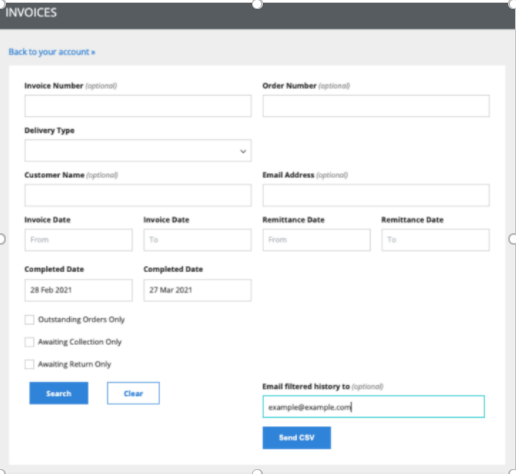
In the Marketplace Portal, you have the ability to download order history based on completed (dispatch date) which lines up with the Myer payments i.e. For sales paid for the month of March 2021, you would filter your order history for orders completed from February 28th to March 27th.
I have a remote desktop – how do I pull a range list from RETEK?
A range list of registered items in RETEK can be pulled via ‘Merchandise Management’
Go to; Reports – Buying Office and Merchandise Services – Miscellaneous – Product Download/Item Range List. You will then get window;
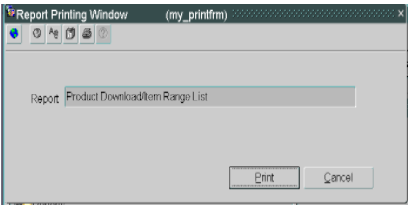
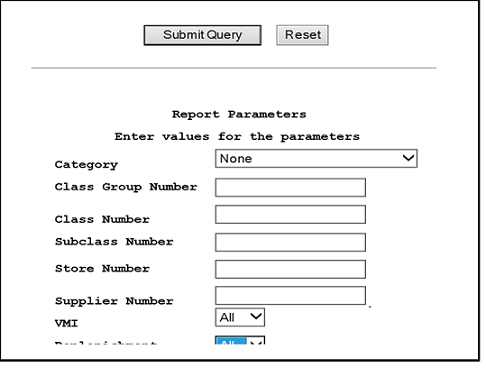
Click ‘Print’ and this window will appear below; Add in Supplier specific class group and Category, then ‘Submit Query’
I have a remote desktop – how do I find Myer Level 1s?
Once you have pulled a range list, the Myer Level 1s are listed with the corresponding barcode or SKU/VPN